
The Problem: Raw Data Doesn't Scale
Andrej Karpathy recently described his workflow for building personal knowledge bases with LLMs: drop papers, tweets, screenshots, and notes into a /rawfolder, then use an LLM to “compile” a wiki of interlinked markdown files. The LLM writes and maintains the wiki. You query it, file the answers back, and the knowledge base compounds over time.
It's a powerful idea, but it's held together by scripts. There's no structural understanding of what connects to what, no confidence scores on inferred relationships, and no way to ask “what path connects concept A to concept B?” without the LLM re-reading everything.
graphify is an open-source tool that takes this idea and gives it structure. Instead of a flat wiki, it builds a knowledge graph— with typed nodes, weighted edges, community detection, and confidence scoring — from any mix of code, docs, papers, and images.
How It Works: Two-Pass Extraction
graphify runs in two passes over your corpus:
Pass 1: Deterministic AST (Code Files)
For .py, .ts, .go, .rs, .java, and 8 more languages, tree-sitter parses the AST to extract classes, functions, imports, call graphs, docstrings, and rationale comments (# WHY:, # HACK:, etc.). No LLM needed — no tokens spent, no file contents leave your machine.
Pass 2: Semantic Extraction (Docs, Papers, Images)
Claude subagents run in parallel over markdown, PDFs, and images (including screenshots, diagrams, and whiteboard photos in any language) to extract concepts, relationships, and design rationale. The results merge with the AST graph into a unified NetworkX structure.
The merged graph is then clustered using Leiden community detection — a graph-topology algorithm that finds communities by edge density. No embeddings, no vector database. The graph structure is the similarity signal. If you want to go deeper into using knowledge graphs for RAG — including Neo4j property graphs, Cypher traversal, and map-reduce over community summaries — see our full GraphRAG implementation guide.
What You Get
graphify-out/
├── graph.html       # interactive graph — click, search, filter by community
├── GRAPH_REPORT.md  # god nodes, surprising connections, suggested questions
├── graph.json       # persistent graph — query weeks later without re-reading
└── cache/           # SHA256 cache — re-runs only process changed files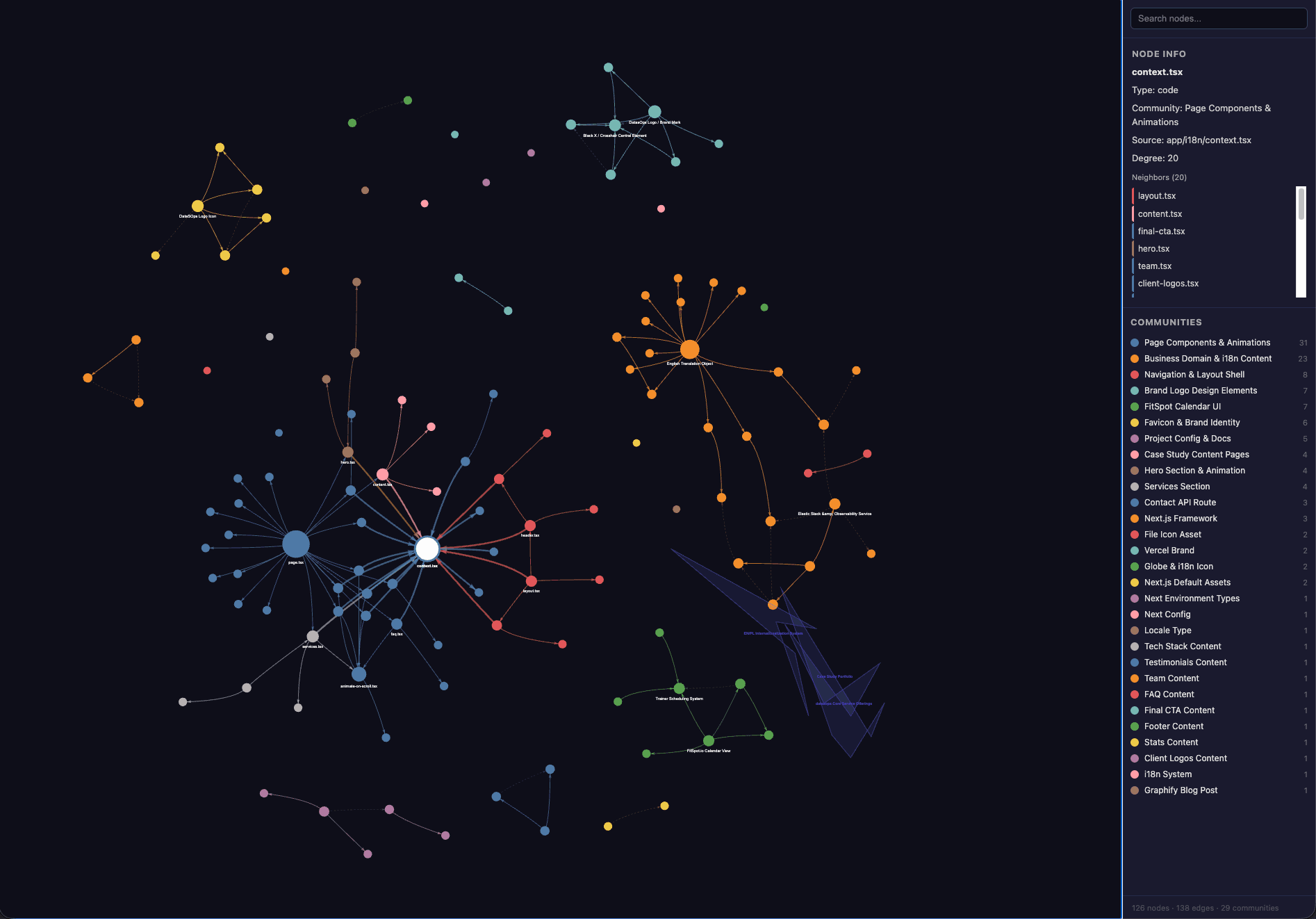
Interactive graph output from graphify — communities are color-coded, node size reflects connectivity
EXTRACTED (found in source, always 1.0), INFERRED (with a 0.0–1.0 confidence), or AMBIGUOUS (flagged for review). You always know what was found vs. guessed.Key Features
Fully Multimodal
Drop in code, PDFs, markdown, screenshots, diagrams, whiteboard photos, images in other languages — graphify uses Claude vision to extract concepts from all of it and connects them into one graph. This is what makes it a true knowledge compiler, not just a code indexer.
71.5x Token Reduction
On a mixed corpus (Karpathy repos + papers + images, 52 files), querying the graph uses 71.5x fewer tokensthan reading raw files. The first run extracts and builds the graph (this costs tokens). Every subsequent query reads the compact graph — that's where the savings compound. Token reduction scales with corpus size.
Always-On Assistant Integration
After building a graph, a single command installs a hook that makes your AI assistant read the graph report before answering architecture questions:
graphify claude install   # Claude Code: CLAUDE.md + PreToolUse hook
graphify codex install    # Codex: AGENTS.md
graphify opencode install # OpenCode: AGENTS.md
Think of it this way: the always-on hook gives your assistant a map. The /graphify query commands let it navigate the map precisely:
/graphify query "what connects attention to the optimizer?"
/graphify query "what connects attention to the optimizer?" --dfs   # trace a specific path
/graphify query "what connects attention to the optimizer?" --budget 1500  # cap at N tokens
/graphify path "DigestAuth" "Response"
/graphify explain "SwinTransformer"
Incremental Updates & Auto-Sync
A SHA256 cache means re-runs only process changed files. The --watch flag auto-syncs the graph as your codebase changes (code saves trigger instant rebuild via AST, doc changes notify for LLM re-pass). Git hooks rebuild the graph on every commit and branch switch.
Flexible Export
/graphify ./raw --obsidian    # generate Obsidian vault
/graphify ./raw --wiki        # agent-crawlable wiki
/graphify ./raw --svg         # export graph.svg
/graphify ./raw --graphml     # Gephi, yEd
/graphify ./raw --neo4j       # generate Cypher for Neo4j
/graphify ./raw --neo4j-push bolt://localhost:7687
Benchmark Results
| Corpus | Files | Token Reduction |
|---|---|---|
| Karpathy repos + 5 papers + 4 images | 52 | 71.5x |
| graphify source + Transformer paper | 4 | 5.4x |
| httpx (synthetic Python library) | 6 | ~1x |
At 6 files the corpus fits in a context window anyway, so graph value is structural clarity, not compression. At 52 files (code + papers + images), you get 71x+ reduction.
Where It Helps
Getting Started
pip install graphifyy && graphify installThen open your AI coding assistant and type:
/graphify .Note
Requires Python 3.10+ and one of: Claude Code, Codex, OpenCode, or OpenClaw. Code files are processed locally via tree-sitter — no file contents leave your machine. Only docs, papers, and images are sent to your platform's model API for semantic extraction.
The project is open-source and available on GitHub. It runs entirely locally (NetworkX + Leiden + tree-sitter + vis.js), with no Neo4j or server required.
Once you have a knowledge graph, the natural next step is querying it with language models. For community summarization, local/global search, and production GraphRAG pipelines, see GraphRAG — Knowledge Graph-Augmented Generation. For vector-search RAG without graph structure, see Retrieval-Augmented Generation (RAG). When graphs are stored in Weaviate with cross-reference properties between entity classes, see the Weaviate production guide for hybrid dense+sparse search patterns that combine vector similarity with graph traversal filters.
Knowledge graphs amplify RAG — instead of retrieving isolated chunks, entity-linked graphs let the retriever follow relationships across documents — see GraphRAG with knowledge graphs for Microsoft's community detection approach that dramatically improves multi-hop question answering. When graph embeddings need to power semantic similarity search alongside structured traversal, see pgvector semantic search — storing node embeddings in Postgres next to the relational graph schema is the lowest-ops path for sub-10M entity datasets. For LLM pipelines that generate structured knowledge from unstructured text before graph ingestion, see LLM structured outputs — entity and relation extraction with enforced JSON schemas eliminates the post-processing step that most graph ETL pipelines require. Once the knowledge graph is built, see Building AI Agents That Actually Work for tool-calling patterns that let agents traverse the graph at inference time.
Building a RAG pipeline or improving retrieval quality for your AI product?
We help teams design and implement production-grade RAG systems — from chunking strategies and hybrid search to reranking, evaluation, and agentic retrieval patterns. Let’s talk.
Send a Message